
SyncFlow
ಸಹಾಯ
Getting startedSyncingRecordingOther apps and mismatched numbersCheckingDeleting data
ಸಹಾಯ ಮುಖಪುಟ›Syncing›How do I enable Auto Sync?

How do I enable Auto Sync?

Complete a manual sync, then turn on Auto Sync on the Sync tab. It is a Premium feature.

What it does

Sync your selected categories for today and the previous two days.

Use Manual Sync for older data.

Set up Auto Sync

  1. In Categories, choose the data to sync.
  2. On Home, tap “Sync”.
  3. Wait for the Manual Sync to finish.
  4. Check the result in “Sync History”.
  5. Open the “Sync” tab.
  6. Turn on “Auto Sync”.

Completion notifications

  1. Turn on “Notifications”.
  2. Allow notifications for SyncFlow in iPhone Settings.
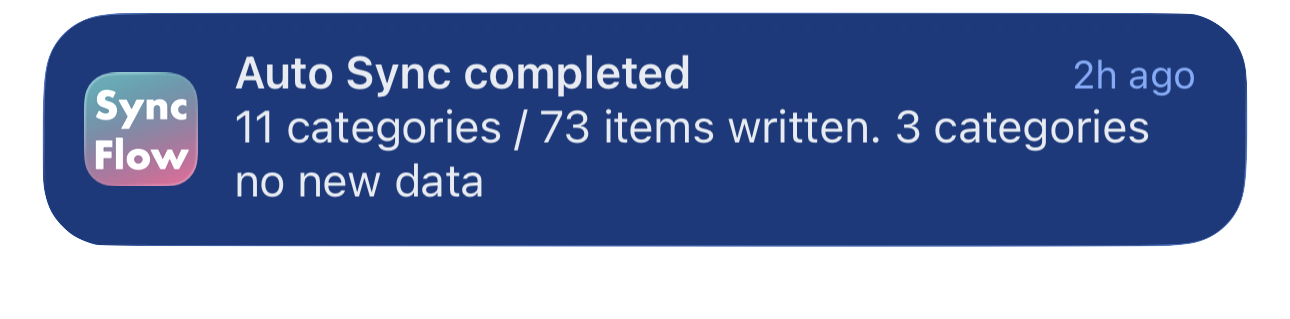
SyncFlow ಆಟೋ ಸಿಂಕ್ ಪೂರ್ಣಗೊಂಡ ಅಧಿಸೂಚನೆಯ ಇಂಗ್ಲಿಷ್ ಉದಾಹರಣೆ; ಸಿಂಕ್ ಆದ ವರ್ಗಗಳು ಮತ್ತು ಹೊಸ ಡೇಟಾ ಇಲ್ಲದ ವರ್ಗಗಳನ್ನು ತೋರಿಸುತ್ತಿದೆ.
ಇಂಗ್ಲಿಷ್ ಪ್ರದರ್ಶನದ ಉದಾಹರಣೆ. ವಿಷಯವು ಸಿಂಕ್ ಫಲಿತಾಂಶವನ್ನು ಅವಲಂಬಿಸಿದೆ.
App Store ನಲ್ಲಿ ಡೌನ್‌ಲೋಡ್ ಮಾಡಿApp Store ನಲ್ಲಿ ಡೌನ್‌ಲೋಡ್ ಮಾಡಿ

ಸಂಬಂಧಿತ ಲೇಖನಗಳು

  • How do Daily total and By record differ? ›
  • Why do numbers differ from Google Health (Fitbit)? ›

ಇನ್ನೂ ಸಹಾಯ ಬೇಕೇ?

ಬೆಂಬಲವನ್ನು ಸಂಪರ್ಕಿಸಿ
SyncFlow

SyncFlow

SyncFlow ಮುಖಪುಟಸಹಾಯಬೆಂಬಲವನ್ನು ಸಂಪರ್ಕಿಸಿ

ನಿಯಮಗಳು

ಗೌಪ್ಯತಾ ನೀತಿಬಳಕೆಯ ನಿಯಮಗಳು

© 2026 SyncFlow