
SyncFlow
ਮਦਦ
Getting startedSyncingRecordingOther apps and mismatched numbersCheckingDeleting data
ਮਦਦ ਹੋਮ›Syncing›How do I enable Auto Sync?

How do I enable Auto Sync?

Complete a manual sync, then turn on Auto Sync on the Sync tab. It is a Premium feature.

What it does

Sync your selected categories for today and the previous two days.

Use Manual Sync for older data.

Set up Auto Sync

  1. In Categories, choose the data to sync.
  2. On Home, tap “Sync”.
  3. Wait for the Manual Sync to finish.
  4. Check the result in “Sync History”.
  5. Open the “Sync” tab.
  6. Turn on “Auto Sync”.

Completion notifications

  1. Turn on “Notifications”.
  2. Allow notifications for SyncFlow in iPhone Settings.
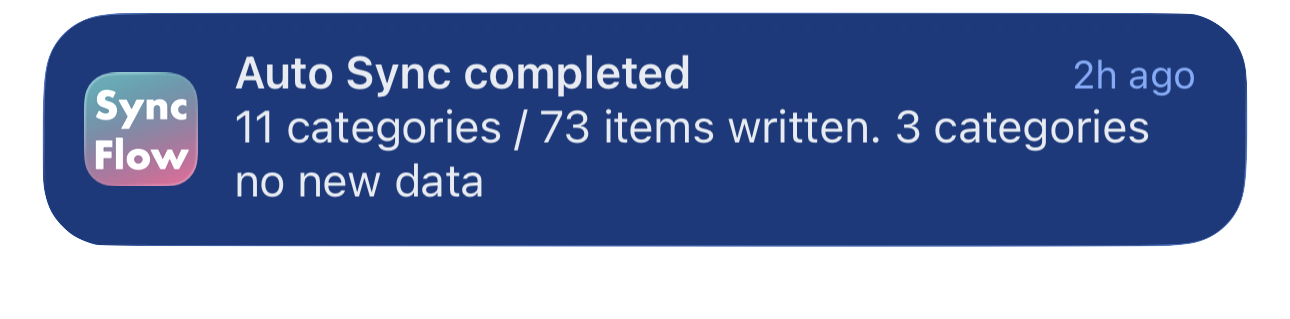
SyncFlow ਦੀ ਆਟੋ ਸਿੰਕ ਮੁਕੰਮਲ ਹੋਣ ਦੀ ਸੂਚਨਾ ਦੀ ਅੰਗਰੇਜ਼ੀ ਉਦਾਹਰਣ, ਜਿਸ ਵਿੱਚ ਸਿੰਕ ਹੋਈਆਂ ਸ਼੍ਰੇਣੀਆਂ ਅਤੇ ਨਵੇਂ ਡੇਟਾ ਤੋਂ ਬਿਨਾਂ ਸ਼੍ਰੇਣੀਆਂ ਦਿਖਾਈਆਂ ਗਈਆਂ ਹਨ।
ਅੰਗਰੇਜ਼ੀ ਵਿੱਚ ਡਿਸਪਲੇ ਦੀ ਉਦਾਹਰਣ। ਸਮੱਗਰੀ ਸਿੰਕ ਦੇ ਨਤੀਜੇ ’ਤੇ ਨਿਰਭਰ ਕਰਦੀ ਹੈ।
App Store ਤੋਂ ਡਾਊਨਲੋਡ ਕਰੋApp Store ਤੋਂ ਡਾਊਨਲੋਡ ਕਰੋ

ਸਬੰਧਤ ਲੇਖ

  • How do Daily total and By record differ? ›
  • Why do numbers differ from Google Health (Fitbit)? ›

ਅਜੇ ਵੀ ਮਦਦ ਚਾਹੀਦੀ ਹੈ?

ਸਹਾਇਤਾ ਨਾਲ ਸੰਪਰਕ ਕਰੋ
SyncFlow

SyncFlow

SyncFlow ਹੋਮਮਦਦਸਹਾਇਤਾ ਨਾਲ ਸੰਪਰਕ ਕਰੋ

ਸ਼ਰਤਾਂ

ਪਰਦੇਦਾਰੀ ਨੀਤੀਵਰਤੋਂ ਦੀਆਂ ਸ਼ਰਤਾਂ

© 2026 SyncFlow