
SyncFlow
ช่วยเหลือ
Getting startedSyncingRecordingOther apps and mismatched numbersCheckingDeleting data
หน้าแรกศูนย์ช่วยเหลือ›Syncing›How do I enable Auto Sync?

How do I enable Auto Sync?

Complete a manual sync, then turn on Auto Sync on the Sync tab. It is a Premium feature.

What it does

Sync your selected categories for today and the previous two days.

Use Manual Sync for older data.

Set up Auto Sync

  1. In Categories, choose the data to sync.
  2. On Home, tap “Sync”.
  3. Wait for the Manual Sync to finish.
  4. Check the result in “Sync History”.
  5. Open the “Sync” tab.
  6. Turn on “Auto Sync”.

Completion notifications

  1. Turn on “Notifications”.
  2. Allow notifications for SyncFlow in iPhone Settings.
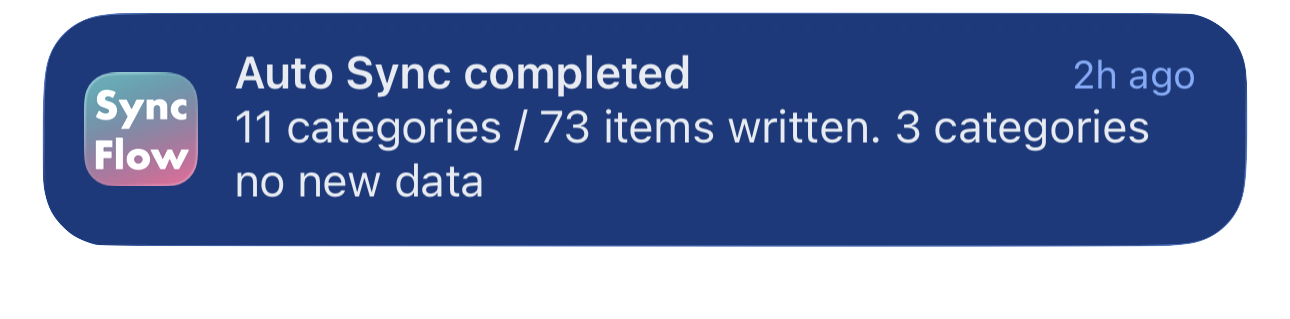
ตัวอย่างภาษาอังกฤษของการแจ้งเตือนซิงค์อัตโนมัติของ SyncFlow เสร็จสมบูรณ์ แสดงหมวดหมู่ที่ซิงค์แล้วและหมวดหมู่ที่ไม่มีข้อมูลใหม่
ตัวอย่างการแสดงผลเป็นภาษาอังกฤษ เนื้อหาขึ้นอยู่กับผลการซิงค์
ดาวน์โหลดจาก App Storeดาวน์โหลดจาก App Store

บทความที่เกี่ยวข้อง

  • How do Daily total and By record differ? ›
  • Why do numbers differ from Google Health (Fitbit)? ›

ยังต้องการความช่วยเหลืออยู่ไหม?

ติดต่อฝ่ายสนับสนุน
SyncFlow

SyncFlow

หน้าแรก SyncFlowช่วยเหลือติดต่อฝ่ายสนับสนุน

ข้อกำหนด

นโยบายความเป็นส่วนตัวข้อกำหนดการใช้งาน

© 2026 SyncFlow