 SyncFlow
What Fitbit data can sync to Apple Health? Steps, sleep, heart rate and more
Short answer
Google Health (Fitbit) can write your Fitbit steps, sleep stages and heart rate to Apple Health, but it cannot write heart rate variability (HRV) or skin temperature.
Even for a supported data type, nothing arrives if your Fitbit did not measure it. The data types Google Health can read from Apple Health are also different from the ones it can write.
What Google Health writes to Health
The Google Health app is what writes your Fitbit records to the iPhone Health app. The table covers the main data types Google Health can write to Health. It also includes records that did not come from a Fitbit, such as weight from a scale or meals you logged by hand.
| Data | Written to Health | What to know when you check |
|---|---|---|
| Steps, distance, floors | Yes | iPhone and Apple Watch records can change the total shown |
| Active calories | Yes | Different from your total calories for the day |
| Sleep duration and stages | Yes | Check duration and stages separately. Some nights have no stages |
| Heart rate, resting heart rate | Yes | They are separate records |
| Oxygen saturation, respiratory rate | Yes | Needs a supported device and a measurement |
| Weight, body fat percentage | Yes | Check that the original record is in Google Health |
| Body temperature, blood glucose | Yes | Not every Fitbit model measures these |
| Nutrition, water | Yes | When Google Health has the record |
| Exercise, exercise routes | Yes | An app that uses the data may not read these records |
| VO2 max | Yes | Needs a supported model and conditions |
| Mindfulness, cycle information | Yes | Coverage differs by type |
| Heart rate variability (HRV) | No | Not written even if you can see it in Google Health |
| Skin temperature | No | Only read from Health into Google Health |
| Blood pressure | Not in the table | Do not assume it is written |
| Resting calories, BMI | Not in the table | Do not assume they are filled in from other values |
This is based on Google Health's data table as checked on November 15, 2026. See the table for every detailed type. "Yes" means Google Health can write that type. If your Fitbit does not measure it, no record arrives.
HRV and skin temperature do not arrive
Google Health can read HRV and skin temperature that are already in Health. Google's table has no feature that writes values measured by your Fitbit to Health.
If HRV appears in Google Health's permission list but no Fitbit HRV records appear in Health, that permission is for reading HRV from Health. To keep your Fitbit HRV in Health on an iPhone with iOS 27 or later, SyncFlow Premium can sync it. If you use another app, first check that it can write Fitbit HRV to Health.
Why the calorie numbers differ
There are three kinds of calories.
| Kind | What it means | Name in Health |
|---|---|---|
| Active calories | Burned by walking or exercise | Active Energy |
| Resting calories | Burned while you sit still | Resting Energy |
| Total calories | Everything burned during the day | None |
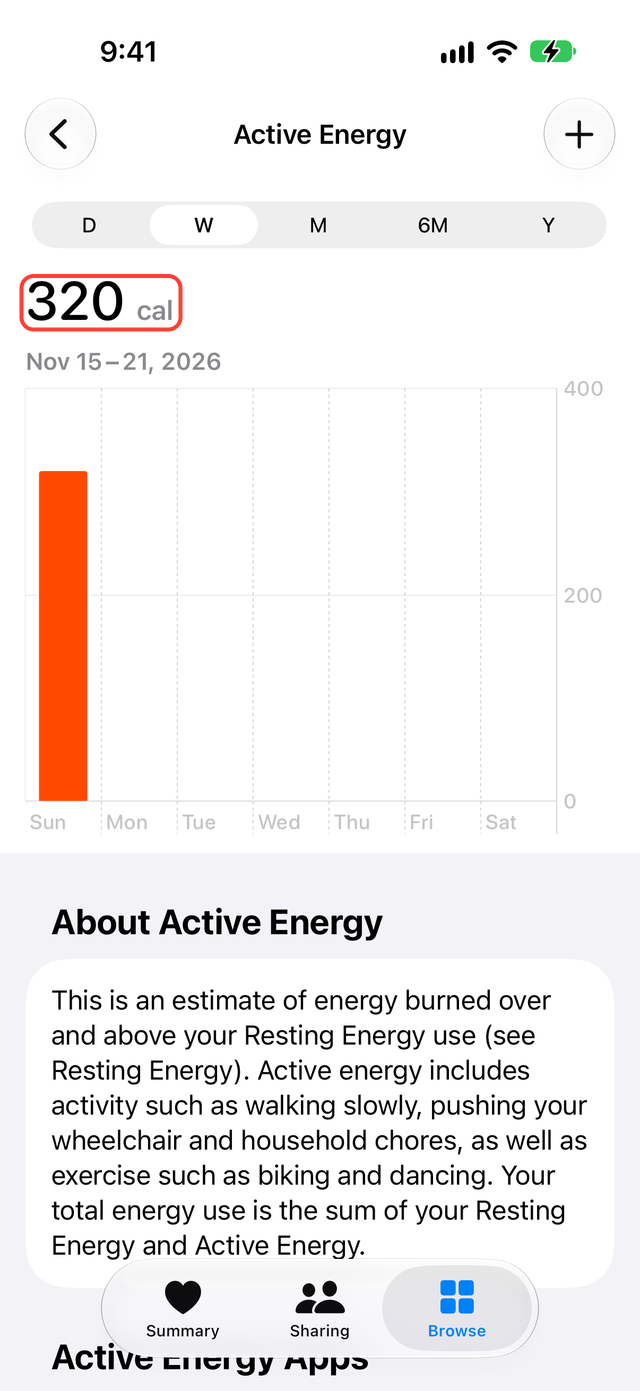
Health shows Active Energy in cal. Your Fitbit may show 2,000 total calories while Health shows 500 Active Energy. That does not mean the sync failed, because the two are different kinds. If a food-tracking app uses the data, check whether it uses total or active calories.
It is supported but not showing
- In Google Health, check that the date has the record.
- In Health, open the same date and the same data type.
- If Google Health has it but Health does not, open Google Health, tap the account icon (your profile picture) at the top right, then Partner apps, then Apple Health, and check that the type is allowed to write. New data types stay off until you allow them.
- If Health has it but another app does not, check that the app is allowed to read Health.
If only sleep stages are missing, check in the same order. If Google Health has no stages for last night, check your Fitbit's measurement. If it does, check the sleep write permission.
What SyncFlow can do
If the Google Health connection already brings in the data you want, keep using it.
SyncFlow connects to Google Health and writes these categories to Health:
- Steps, distance, floors
- Active Energy, Resting Energy, Dietary Energy
- Sleep, water
- Weight, body fat percentage
- Resting heart rate, oxygen saturation, respiratory rate
- Heart rate variability (iOS 27 or later)
Steps, sleep and weight for the last 30 days are free. Other categories and records older than 30 days need Premium, which costs $9.99 per month or $39.99 per year, with no free trial. For categories such as steps, you can save by Daily total or By record.
The categories SyncFlow syncs differ from the Google Health connection. SyncFlow does not sync heart rate readings taken throughout the day, body temperature, or blood glucose. It does not create records Google Health does not have or fill in values your Fitbit did not measure. Sync History shows the result by date; the free version shows the latest day.