 SyncFlow
Google Health vs SyncFlow - how to sync Fitbit data to Apple Health
Short answer
If you only want your Fitbit steps and sleep in Apple Health, try the free Apple Health connection in the Google Health (Fitbit) app first.
If you want to move older records or check the result of each sync by date, compare the differences with SyncFlow below.
Which one do you need?
The table compares the Google Health app's free connection with SyncFlow by what you want to do.
| What you want | Google Health's free connection | SyncFlow |
|---|---|---|
| Get today's steps or last night's sleep into Apple Health | Yes | Yes (steps, sleep and weight are free for the last 30 days) |
| Move records from before you connected | Google's help does not say how far back it writes | With Premium, you can import records older than 30 days after the first sync, but returning users cannot import records from before each category's switch date |
| Check which items were synced and when | Open each record in Apple Health | Sync History shows each synced item and its result (free users see the latest day) |
| Use it without opening the app | Writes automatically | Auto Sync is part of Premium; exact run times are not guaranteed |
| Cost | Free | Steps, sleep and weight for the last 30 days are free. Everything else is Premium ($9.99 per month or $39.99 per year) |
The table compares how each option works. What actually arrives, and for which dates, depends on your Fitbit model, your settings and the records Google Health holds.
Try the free connection first
The Google Health app can write your Fitbit steps, sleep, heart rate and more to Apple Health.
- In the Google Health app, tap the account icon (your profile picture) at the top right, then Partner apps.
- Under Add connections, tap Apple Health, then tap Get started.
- On the consent page, tap Agree. Then tap Turn All Categories On, or select only the categories you want and tap Allow.
- Tap Done. Then open Apple's Health app and check for today's steps, or last night's sleep tomorrow morning.
These steps follow Google's help for using Apple Health with Google Health. If you connected but see nothing, check that Google Health has today's steps, then check the write permissions in Health.
If you want to keep old Fitbit records
Pick one date from before you connected, such as a walk on last year's vacation.
- Check that Google Health has a record for that day.
- Open the same item and date in Apple Health.
- If it is there, check two or three other old dates.
- If it is missing, look at an app that can import past records.
Google's help does not say how far back the Google Health app writes records from before you connected. If the dates you need are already in Apple Health, you do not need another app.
If you want to check what was synced
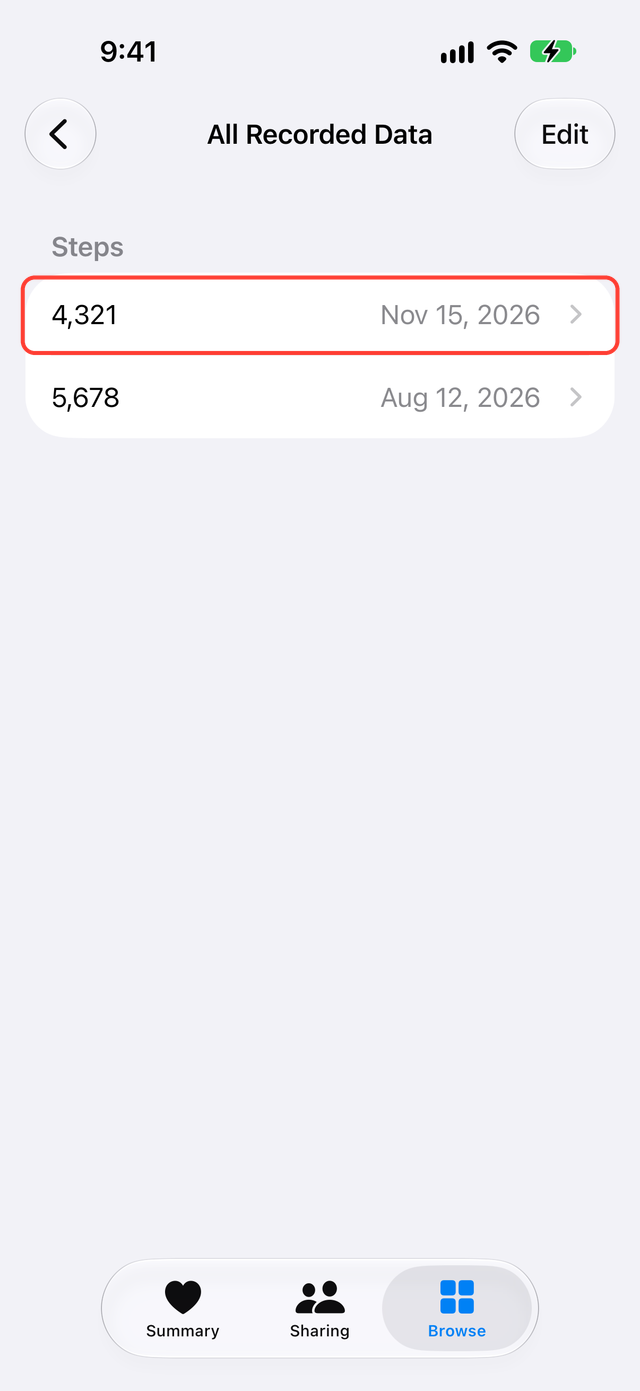
With the Google Health connection, you check the result in Apple Health. Tap Browse, then Activity, then Steps, scroll to the bottom, and tap Show All Data. Compare the records for the same date one by one. Health also receives steps from your iPhone and Apple Watch, so the daily total alone does not tell you where a record came from.
SyncFlow's Sync History is useful when you want to look back at the dates and items it brought in. A finished SyncFlow sync does not mean another app will use the values, so check the record in Health at the end.
What to weigh before you choose
Someone who wants to move old records once needs different features from someone who wants a daily automatic sync. The Google Health app already writes to Apple Health automatically, so that alone is not a reason to pick another app.
What SyncFlow can do
SyncFlow is an app that connects to Google Health and syncs your Fitbit records to Apple Health. Compare the range of past records it imports, Sync History, and the free and paid limits. Compared with the free connection:
- With Premium, you can import records older than 30 days in one go.
- Sync History shows the dates and items it brought in.
- Auto Sync is part of Premium. iPhone conditions can delay it.
On the free plan you can sync steps, sleep and weight for the last 30 days by hand. Manual sync works once a day, and you can watch a video to sync again.
If you do not need these, the free connection is enough.